
A ranking drop feels alarming the moment you spot it. Numbers slide down a report, and panic sets in fast. Real diagnosis starts with data, not guesswork or gut reactions. The steps below separate confirmed algorithm impact from unrelated technical, demand, or content problems.
Skipping steps can lead to unnecessary changes and delay recovery work. Each section builds on the last, moving from confirmation to actual recovery. Follow the order, since jumping ahead often means fixing the wrong thing first.
Confirm The Ranking Drop Really Happened
Compare Rankings Before And After
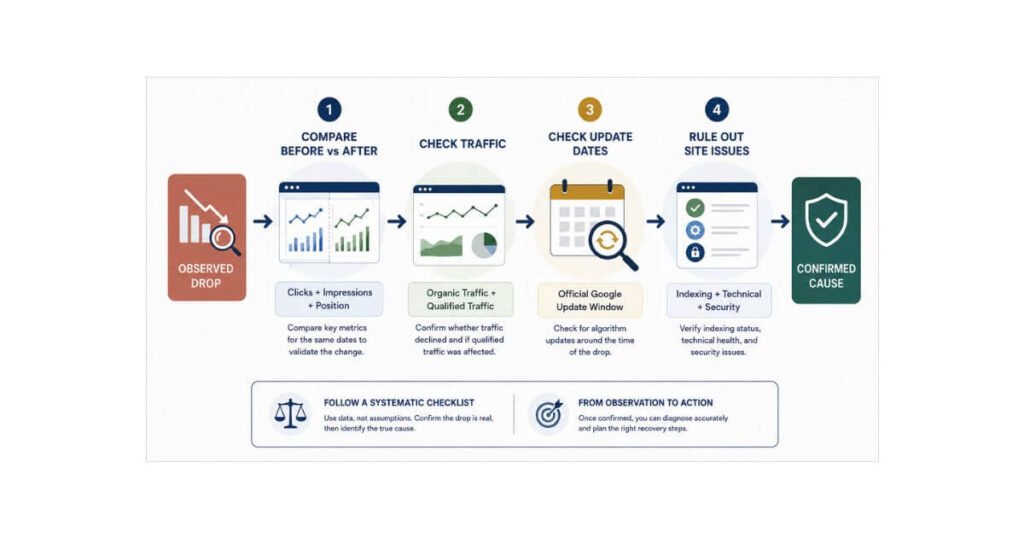
Open Google Search Console before assuming anything went wrong. Pull your search queries and landing pages for the affected date range. Compare average position, clicks, and impressions across two clear periods. A single day’s dip rarely means a real drop occurred.
Separate branded versus non branded searches, since they often move independently. Extend the comparison to year over year and a 16 month view, since short windows can hide seasonal patterns. Check ranking changes across multiple pages, not just one keyword. A Law Firm SEO review after any Google update helps separate algorithm noise from real site issues.
Check Whether Traffic Also Changed
Rankings and traffic do not always move together. Review organic clicks and organic impressions for the same period. A ranking drop without a traffic drop often means something smaller shifted. Watch qualified traffic closely, since that number reflects real business impact.
Break traffic down by practice area traffic and local traffic separately. A dip in one practice area rarely explains a site wide problem. Check whether the drop reflects your site specifically or a broader shift in demand. Use Google Trends to see if interest in the affected queries declined market wide.
Check If Google Actually Released An Update
Match The Drop With Update Dates
Visit the Google Search Status Dashboard next. This page lists confirmed Google updates as they roll out. Look for core updates, spam updates, or other ranking system changes nearby. Note the update start and end dates listed there.
Compare the timing of your ranking decline with the official update period. A decline that clearly predates the confirmed update should not automatically be attributed to that update. Overlap matters more than rough proximity in this comparison. The Google Search Status Dashboard remains the most reliable source for this timing check.
Separate Updates From Technical Problems
Timing alone does not prove an algorithm update caused your decline. Check for a recent website migration or full redesign first. Review indexing changes, robots directives, and canonical changes made around that time. Server problems can mimic an algorithm hit almost perfectly. Check Search Console for Manual Actions and Security Issues before attributing the decline to a core update.
Look for major content changes made close to the drop date too. Lost pages and broken redirects often explain sudden visibility loss. Many firms blame an update when a redesign quietly broke their site instead. Ruling out these causes first saves weeks of misdirected work.
Find Which Pages Lost Search Visibility
Identify Your Most Affected Pages
Not every page drops equally during a real update. Review click decline, impression decline, and position decline page by page. Note query loss tied to each affected page directly. Group results by practice area, location, and search intent.
Look for patterns across pages instead of diagnosing one keyword alone. A single lost keyword rarely signals a real problem. Five location pages losing visibility together tells a different story. Patterns reveal the real scope of the drop far better than isolated numbers.
Compare Lost Queries And Topics
Identify lost practice area queries first, since they carry the most business value. Then check lost location queries and lost informational queries separately. Note any lost high intent searches, since those cost real cases. New competing results often explain exactly why visibility weakened.
Map the topics where visibility weakened using this simple chain. Look at what’s now ranking for the same queries. If a new competitor or a different page type has taken the spot, that’s a stronger signal than the query loss itself.
Investigate Technical And Sitewide Changes
Check Indexing And Accessibility
Review crawlability and indexability for every affected page first. Confirm canonical URLs point correctly, without accidental duplication errors. Check robots directives, sitemaps, and redirects for recent changes. Rendering problems can quietly hide strong content from search engines.
Internal links pointing to affected pages deserve a close look too. Mobile accessibility issues often explain drops that seem otherwise unexplainable. Rendering problems on mobile can hide strong content from search engines even when the page is otherwise indexable. Fixing these issues sometimes resolves what looked like an algorithm problem.
Check Changes Across The Website
Look for changes to navigation made around the drop date. URL structure changes can quietly break internal linking sitewide. Review internal linking, templates, and content changes across the site. Metadata changes made during a redesign often go unnoticed.
CMS or hosting changes sometimes explain sitewide performance shifts. Website architecture changes affect crawl efficiency more than most firms expect. For a full technical review process, see our guide on how to audit a law firm website for SEO. These sitewide checks often catch what page level review misses.
Check Whether Search Intent Has Shifted
Compare Old And Current SERPs
| Change observed | What it suggests |
| Page type changed (service → guide) | Intent may have shifted |
| Local pack expanded | Local competition/intent increased |
| Forums/UGC increased | Search result composition changed |
| Informational pages replaced service pages | Query expectation changed |
| AI Overview appeared | Organic click opportunity may be reduced |
Reassess Your Page’s Search Purpose
Ask what the current SERP suggests the searcher actually wants right now. Then compare that answer with what your page actually provides today. A gap between the two points straight to the real problem. This mismatch grows over time as search behavior quietly changes.
Follow this relationship to understand the full picture clearly. Realigning the page with current intent can help recover visibility, though results vary by term and competition.
Compare Your Content With Current Results
Check What Now Ranks Above You
Study the pages currently outranking yours for the same terms. Compare their search intent match against your own page’s purpose. Note their content depth, original information, and supporting evidence. Check their expertise, completeness, and overall usefulness too.
A page purpose mismatch explains many drops better than any penalty theory. If a service page lost to a guide, intent likely shifted. This comparison can reveal whether the pages ranking above yours differ in intent, usefulness, evidence, or local relevance.
Look For Missing Information Gain
Ask whether your page provides original information a reader cannot find elsewhere. Ask whether it answers the important questions readers actually type into Google. Check whether it includes attorney commentary, anonymized case patterns, jurisdiction specific explanation, or firm specific process detail, not just a restatement of the query. Ask whether it offers useful evidence to back up its statements.
Ask whether your page offers something beyond what competing pages already provide. Improve the page because it delivers more value, not because an update occurred. Chasing the algorithm instead of the reader rarely produces lasting results. For deeper context on this pattern, read our guide on why competitor firms with worse websites outrank you.
Decide What Your Ranking Drop Requires
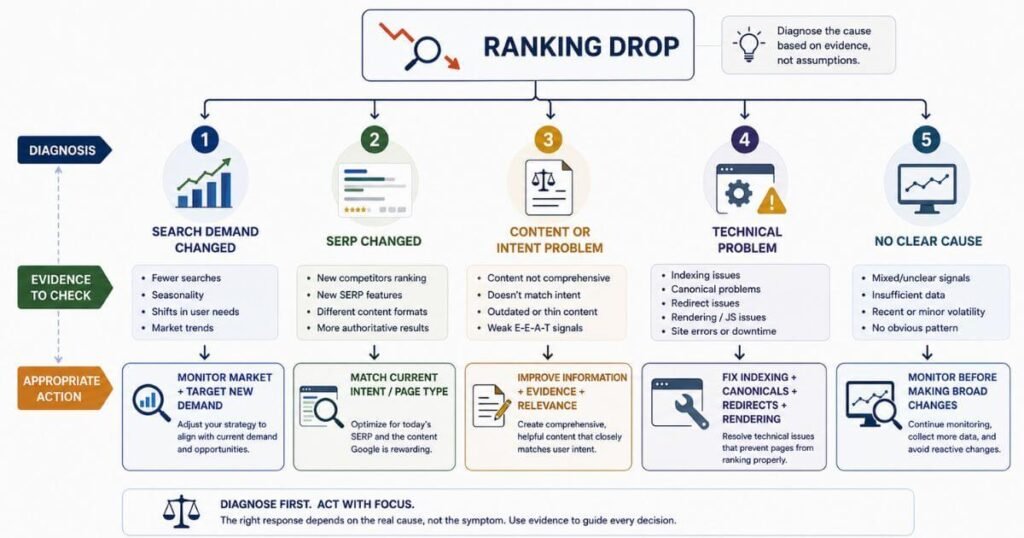
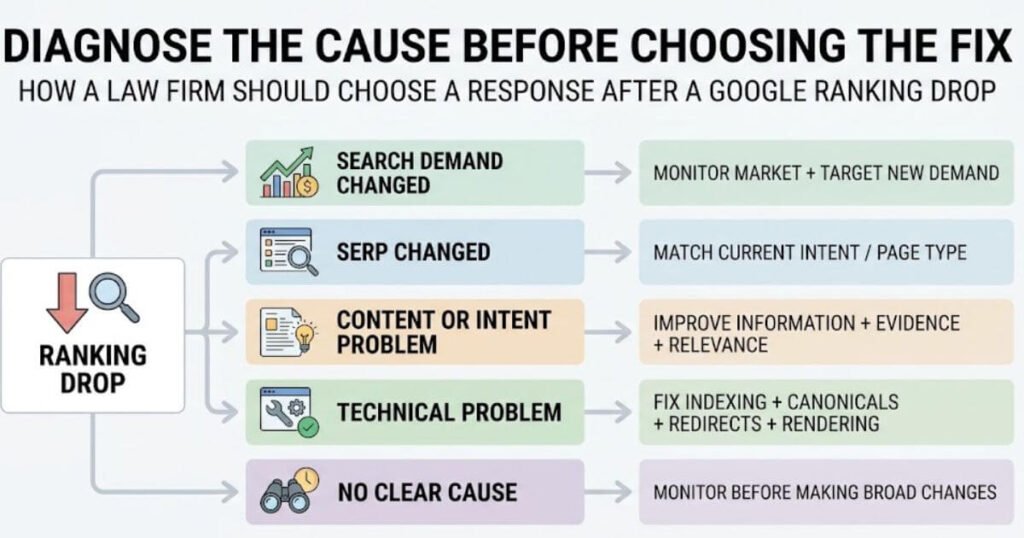
- If Google Trends shows a broader decline in interest for your affected queries, treat this as a market shift, not a site problem.
- If competing pages or SERP features changed but your own site looks unaffected, the drop may reflect what Google now surfaces for that intent, not a fault on your page.
- If no clear cause emerges, avoid broad changes. Monitor for another reporting cycle before acting on a guess.
If Evidence Points to a Content or Intent Problem
- Add meaningful information readers cannot find elsewhere
- Strengthen relevant expertise shown throughout the page
- Improve evidence backing every claim made
- Remove redundancy across similar pages
- Align the page with current search intent
If Evidence Points to a Technical Problem
- Restore indexing for affected pages
- Correct canonicalization errors sitewide
- Repair broken redirects immediately
- Improve internal linking to affected pages
- Resolve rendering issues blocking content
- Fix accessibility problems across devices
If Search Demand Has Changed
- Treat the drop as a market shift, not a site problem, if Google Trends shows a broader decline in interest for the affected queries
- Focus on new, higher demand queries within the same practice area
- Avoid rewriting or optimizing a page further for a query that has genuinely lost search demand
If The SERP Itself Has Changed
- Check whether competing pages, page types, or SERP features around your query changed while your own rankings, content, and technical setup look unaffected
- Focus on matching the new intent or page type rather than assuming something is broken on your site
- Treat this as a market position shift, not a fault to fix
If No Clear Cause Emerges
- Avoid making broad changes based on a guess
- Monitor performance for another reporting cycle, since some fluctuations resolve on their own
- Wait for a clear signal before acting, since premature changes can create a second problem on top of the original one
Avoid Panic Changes After Updates
Do not immediately rewrite every page on the site. Avoid deleting large sections out of pure panic. Changing every title at once rarely produces a real fix. Publishing dozens of articles overnight will not reverse a drop.
Copying competitors or buying links only adds new risk. Rebuilding the entire website should never be a first reaction. Google’s guidance on core updates emphasizes that a ranking drop does not automatically mean a page violated Google’s guidelines or that there is one specific technical fix required. Patience paired with real diagnosis beats every panic driven shortcut.
Build A Recovery Plan From Evidence
Prioritize Pages By Business Value
Not every affected page deserves equal attention right away. Prioritize pages with significant traffic loss first. Valuable search intent and strong case potential matter more than raw traffic. Important practice areas and important locations should move to the top of the list.
Existing authority also shapes where to focus first. Weaker pages may need more work for less potential return. This priority order keeps limited time focused on real business impact.
Track Changes After Recovery Work
Track qualified organic traffic, leads, and cases as separate business metrics, not as Google ranking signals. Qualified organic traffic tells a clearer story than rankings alone. Leads and practice area visibility confirm whether recovery is actually working.
Compare performance against the pre-update baseline every few weeks. A single strong week does not confirm full recovery yet. Recovery should be measured through multiple signals rather than one ranking position. Consistent movement across several signals confirms real progress.
Frequently Asked Questions
Why Did My Law Firm Rankings Suddenly Drop?
A sudden drop can trace back to a confirmed core update, a technical issue, a security issue or manual action, a content quality problem, a shift in search demand, or a recent site migration. Check the Google Search Status Dashboard first, then rule out recent site changes before assuming an algorithm caused it.
How Can I Tell If Google Updated?
Compare your ranking decline dates against the confirmed update period listed on the Google Search Status Dashboard. Overlapping dates suggest a connection, while a mismatch points toward a technical or content cause instead.
Should I Change My Website After An Update?
Only change pages backed by clear evidence of a real problem. Random edits made out of panic often create new issues without fixing the original drop.
How Long Does Google Recovery Take?
Recovery timelines vary widely depending on the cause and the fix applied. Technical fixes sometimes show movement within weeks, while content, authority, or demand related changes can take anywhere from a few weeks to several months.
Can A Core Update Hurt Good Content?
Yes. A core update doesn’t mean a page violated guidelines or was penalized. It means Google reassessed the results, and another page may now be considered more useful or relevant. Quality alone does not guarantee a stable position when the broader search landscape shifts.
Find What Caused Your Ranking Drop
A ranking drop after an update needs attribution before intervention. Confirm the decline, check search demand, compare the update window, rule out security issues and manual actions, identify affected pages, compare the current SERP, and only then choose a fix. Visit faheembhatti.com today. We will walk through your rankings, your traffic, and your technical setup together. From there, you get a clear answer instead of another guess.
