

Your Google Business Profile category helps Google understand your business and affects local ranking. Google uses it to match your firm with the right searches. A vague category like “Lawyer” gives Google less information about what makes your firm distinct. A specific category like “Personal Injury Attorney” gives Google more accurate information to match your firm to relevant searches.
This guide breaks down how to pick the right primary and secondary categories for your law firm SEO. You will learn how to identify your main practice area, choose the right category from Google’s list, and avoid mistakes that quietly hurt your map pack ranking. Each section includes steps you can apply right away.
Why GBP Categories Matter for Law Firms
Google says your category affects local ranking and helps Google understand what your business does. It does not say the category outweighs every other setting on your profile. A precise category improves relevance for local intent searches. A vague one weakens how clearly Google can match your firm to the right search.
- Categories help Google understand your business
- Categories come from a fixed Google list, not free text
- Precise categories match precise local searches
- Vague categories reduce relevance in local results
Step 1: Identify Your Firm’s Main Practice Area
List every legal service your firm currently offers and drop anything you no longer handle. One practical way to find your dominant practice is comparing case volume and revenue across areas. This is a business decision, not a Google requirement. This exercise reveals your true core practice area. It should anchor your primary category, while everything else becomes secondary.
| Question | Your Answer |
| What is the firm’s main practice? | |
| Which service generates most business? | |
| What other legal services are offered? | |
| Which services are no longer offered? |
Step 2: Find Google’s Current Business Categories
Google’s categories live inside a controlled list that changes over time. Always check the live dashboard instead of an old article. Sign in at business.google.com, open your profile, and go to the business category section. Type your practice area into the search field to see current, real options. Review Google’s official guidance on choosing business categories before making changes to your profile.
GBP Dashboard → Edit Profile → Business Category → Search Available Categories
Step 3: Choose the Right Primary Category
Your primary category is the setting Google uses to understand your firm’s core business. Choose the most specific option available, such as personal injury attorney instead of law firm, whenever one practice area clearly leads. Use the generic law firm category if no single practice area best represents your business overall.
What is the firm’s main business?
↓
Which current Google category best describes it?
↓
Is the category specific and genuinely relevant?
↓
Does the firm actually provide that service?
↓
Select the most accurate primary category
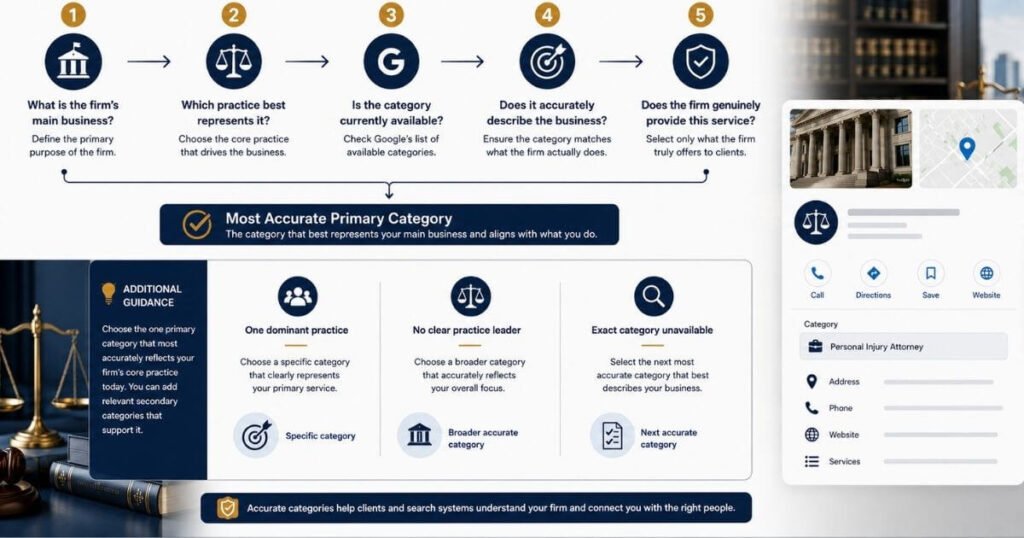
Category decision matrix
| Firm situation | Primary category decision |
| One dominant practice | Most specific available category describing that practice |
| Several practices, no clear leader | A broader category may fit better |
| New service added | Check if a real additional category exists first |
| Exact category unavailable | Choose the next most accurate available category |
| Service offered but not core | Don’t make it the primary category |
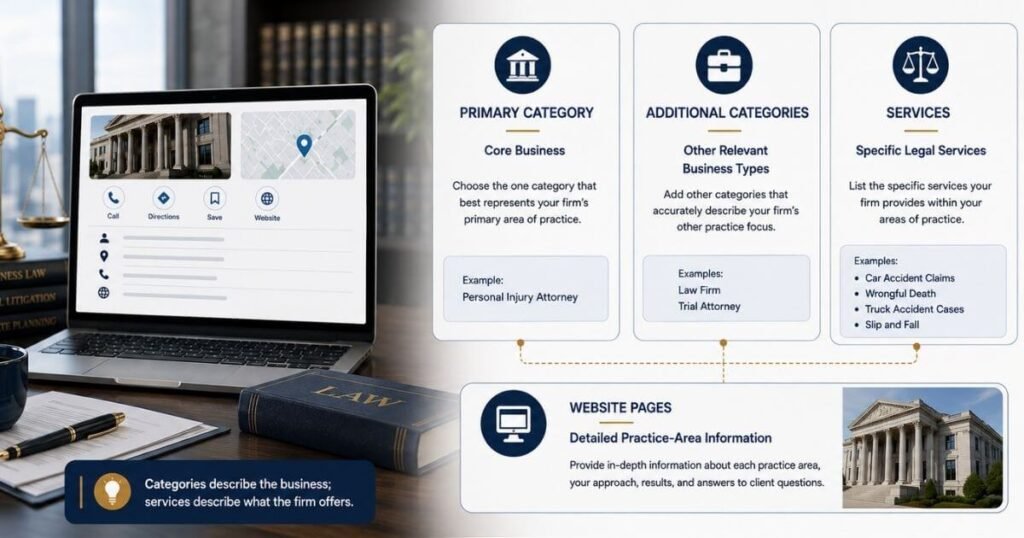
What your profile fields represent
| Profile element | What it should represent |
| Primary category | Your firm’s core business |
| Additional categories | Other real business types you operate |
| Services | Specific legal services you offer |
| Website pages | Detailed practice-area information |
Google recommends choosing categories that describe what your business is, not a category for every service you offer.
Step 4: Choose Relevant Secondary Categories
Secondary categories round out your listing without stealing focus from your primary choice. Google allows up to nine additional categories, but its own guidance says to use as few as possible. A common editorial recommendation is two or three well matched additions, but this is not a Google rule. Add only categories tied to services you genuinely provide, and search each one individually to confirm it still exists.
| Category check | Yes or No |
| Does the firm offer this service? | |
| Is the category currently available? | |
| Does it accurately describe the practice? | |
| Is it relevant to the firm’s clients? | |
| Does it support the firm’s actual service mix? |
Step 5: Check Your Category Choice Against Your Profile
Your category should also align with the firm’s broader local search strategy. The website, practice area pages, business description, and services section should all reinforce the same legal services and location. For a broader explanation of how these elements support local visibility, see our guide to law firm SEO.
| Profile area | What to compare |
| Primary category | Main practice |
| Secondary categories | Additional real services |
| Website | Practice areas |
| Business description | Actual services |
| Services section | Current offerings |
Step 6: Avoid Common Category Selection Mistakes
Many firms treat categories like keyword fields, stuffing in unrelated terms to chase extra searches. Others copy a competitor’s category list without checking their own services.
| Do | Don’t |
| Use Google’s current categories | Invent category names |
| Select genuinely relevant categories | Add unrelated services |
| Check the live category list | Trust outdated lists |
| Review categories when the practice changes | Copy competitors without checking relevance |
Step 7: Review Categories When Your Practice Changes
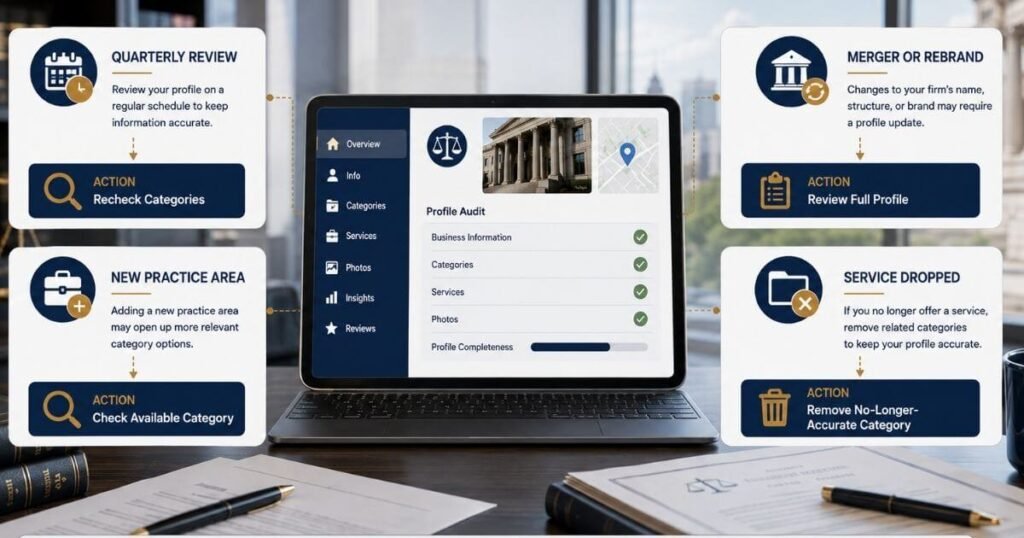
Your categories are not a one time setup. A practical schedule is a quarterly review, along with a check right after adding a new practice area, completing a merger, or dropping a service. Treat this review as part of your regular profile audit, alongside reviews, photos, and posts.
| Review trigger | Action |
| Quarterly schedule | Recheck all categories |
| New practice area added | Add matching category |
| Merger or rebrand | Recheck full category list |
| Service dropped | Remove that category |
| Regular profile audit | Fold category checks into it |
FAQs
What are the business categories on Google?
Business categories are labels that tell Google what your firm does. They help Google match your listing to the right local searches.
How do I add categories in my Google Business Profile?
Log in to your profile and open the Business Information tab. Click the edit icon next to categories and add your primary and secondary categories from the list.
What if the exact category I want isn’t available?
Choose the next most accurate category on Google’s list. A more general but accurate category is the right fallback.
Should a general practice firm use a broad category?
Yes, if the firm truly handles several practice areas evenly.
Can I change my primary category later?
Yes. Google lets you edit your primary category any time your business changes.
Should every practice area have its own additional category?
No. Only add a category for practice areas that genuinely describe your business, not every service you list on your website.
Does adding more categories improve my ranking?
No. Adding categories that don’t genuinely describe your business can reduce relevance instead of improving it. Google recommends using as few categories as possible.
Ready to Choose the Right Google Business Profile Categories?
Stop losing local clients to a vague listing. Update your Google Business Profile categories today and start showing up for the searches that matter to your practice. Visit faheembhatti.com to get your law firm’s Google Business Profile reviewed for free.
