
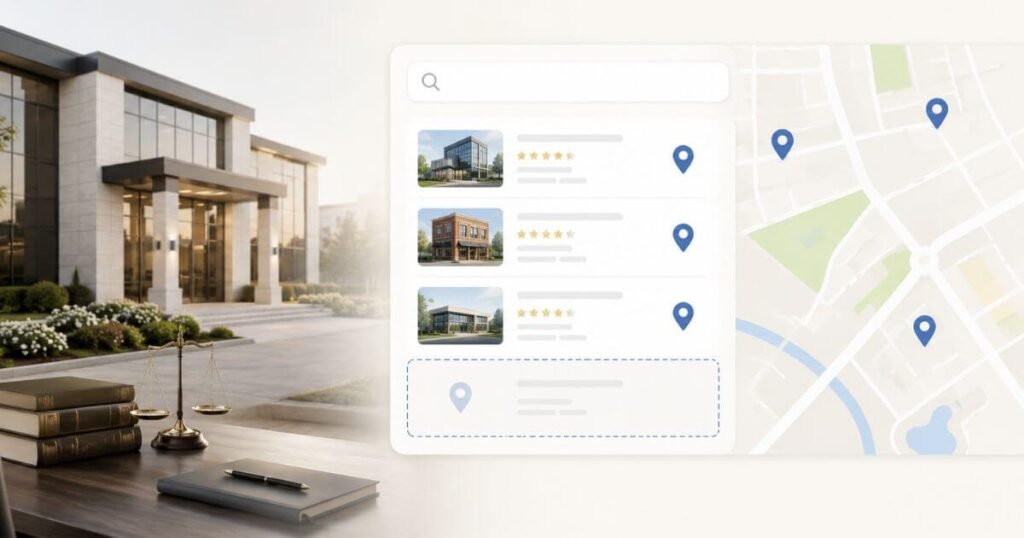
A prospect searches for a lawyer nearby, and your firm never shows up. A prospect searches for a lawyer nearby, and your firm never shows up. That lost client opportunity can be costly. Most firms panic and change random settings without understanding what broke. Most visibility problems are simple. They are also fixable.
Three common causes exist. Your profile is unverified. Your listing is duplicated. Your address is wrong. The most common causes are an unverified profile, a duplicate listing, or an inaccurate address. This guide walks through each possibility in order of how quickly you can check them. Work through them one at a time. You will find the exact problem. You will find the exact fix.
Start by Checking What Not Showing Actually Means
Search Your Firm by Name First
Type your exact business name in the search bar. See what appears. You show up here but nowhere else? You have a visibility gap. Your profile is not broken. This one test tells you whether Google even recognizes your firm at all. You do not show up at all?
Test the Main Non Branded Searches
Search terms like lawyer near me or personal injury lawyer near me next. These non branded searches show how strangers actually find firms like yours. Try a few phrases your real clients would type, not just the obvious ones.
Check Google Maps and the Local Pack Separately
Open Google Maps on its own, then run the same search on regular Google. The local pack and the map app do not always show the same three listings. Maps and local pack results don’t always show the same listings. A firm can rank well in one and be absent from the other. This is why you need to test both separately. Testing both separately tells you which channel has the problem.
Repeat the Search From Different Locations
Test searches from multiple neighborhoods across your service area. Proximity significantly affects local rankings. A firm can rank top 3 near its office and disappear from results a few miles away. Distance significantly impacts local rankings because Google prioritizes results closest to the searcher. Google’s local algorithm weights distance based on searcher location, so results shift with geography. Use a mobile phone away from your office network to avoid location bias.
Check Whether Your Google Business Profile Is Eligible to Appear
Confirm the Profile Is Claimed and Verified
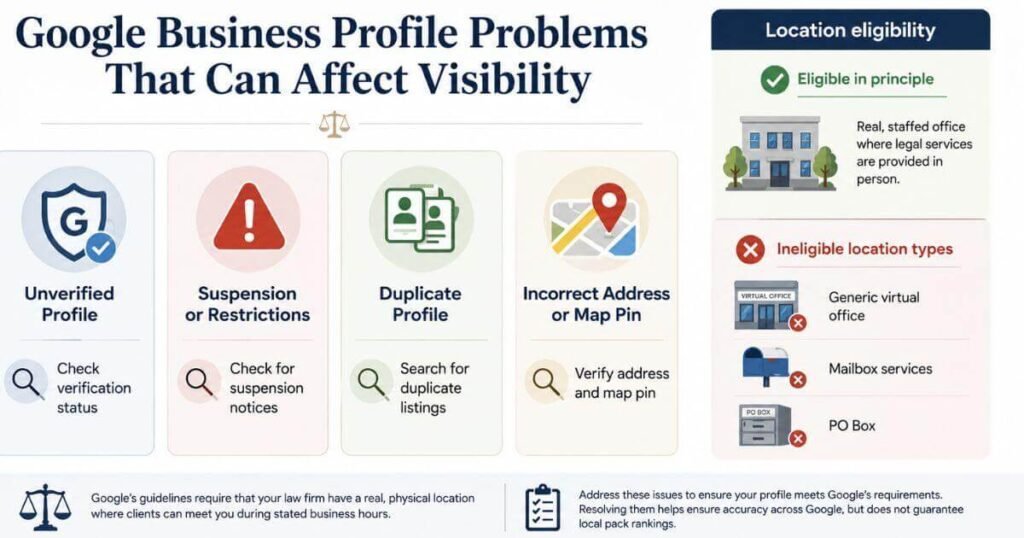
Unverified profiles are less likely to appear in search results and Maps. Verification is one of the first eligibility requirements. Check ownership status whenever a listing suddenly goes missing.
Check ownership status first whenever a listing suddenly goes missing. Many firms assume they finished verification years ago and never check again.
Check for Suspension or Restrictions
A suspension restricts your profile’s visibility on Maps and Search. Some suspensions are partial (profile shows but edits are blocked). You do not show up at all? Log in to your dashboard. Check if your profile is suspended. Appeal if you need to. Some locations are not eligible. Virtual offices don’t work. Mailbox services don’t work. P.O. boxes don’t work. A coworking space can work. Only if three things are true:
- Clear signage exists
- Your employees staff it during business hours
- Customers visit there
Confirm the Business Location Is Eligible
Virtual offices are not eligible. Mailbox services are not eligible. P.O. boxes are not eligible. Virtual mailboxes are not eligible. Google will not accept any of these locations.
A coworking space can work, but only if three things are true. Your space must have clear signage so people can see your business name. Your employees must staff it during business hours. Customers must visit there and use your services.
Look for Duplicate Profiles
Search your firm’s name, phone number, and address separately to find hidden copies. You may have two profiles. Google sees them as duplicates. Google may hide one or both. Your reviews get split. Your information gets split. Your visibility goes down. One complete profile works better than two incomplete ones.
Find Out if Location Is the Real Problem
Search From Your Office Location
Run your target searches from your actual office first. This gives you a baseline for how your firm performs closest to home. Most firms rank strongest right around their own front door.
Test Searches From Your Target Areas
Then test the same searches from neighborhoods you actually want clients from. Proximity to the searcher plays a bigger role in local rankings than most firms realize. Proximity significantly affects which firms appear. Results can shift with just a few miles of distance change, depending on market density and local competition.
Compare Results Across the Service Area
Map out where your firm shows and where it disappears across your service area. This tells you if the issue is a ranking problem or a coverage problem. Weak coverage in one neighborhood often points to a nearby firm dominating that zone.
Understand Why Local Results Change by Searcher
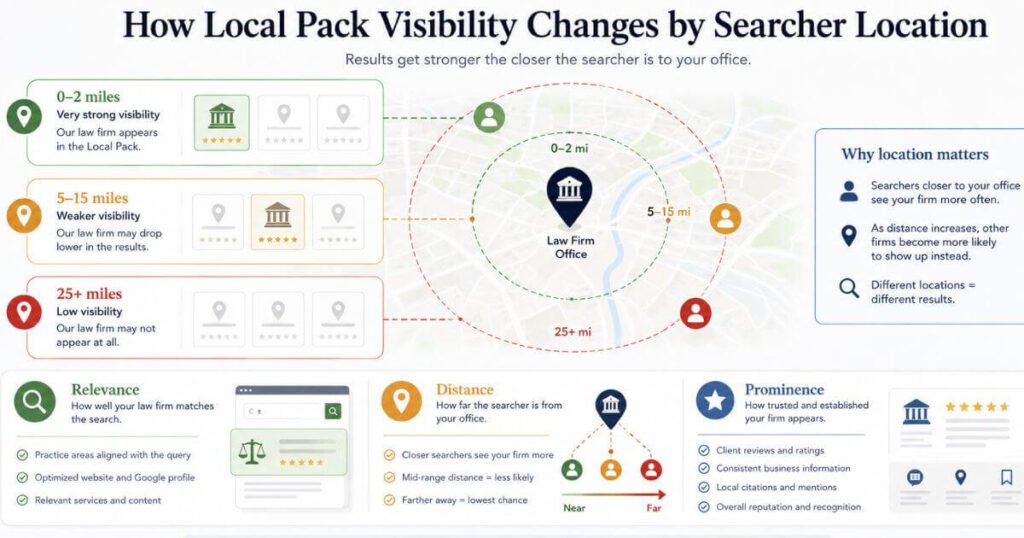
There is no single local pack for a whole city. Every searcher gets their own version based on where they are standing. Google ranks local results three ways:
- Relevance (does it match the search)
- Distance (how far away is it)
- Prominence (how well-known is it)
Distance is measured from where the person searches. See Google’s official guidance on how to improve your local ranking for the factors that influence local visibility.
Check Whether Google Understands What Your Firm Does
Review the Primary Business Category
Your primary business category is a key factor in local visibility. Google uses it to match your firm with relevant searches. A firm listed as “Lawyer” may not appear in searches for “personal injury attorney,” while a competitor with that specific category will.
Why it matters:
Google matches search intent to your category. Choose the most specific category that accurately describes your main practice area. See Google’s guidance on business categories for available options.
Action:
Review your primary category. If you’ve added new practice areas since you created your profile, update it to reflect what you practice most now.
Check Your Practice Area Information
Make sure your listed services match what you actually practice day to day. Gaps here confuse Google about which searches your firm deserves to appear in. Remove any old service you stopped offering years ago.
Compare Your Profile With the Search Intent
Read your profile the way a stressed client would. Does it clearly answer what kind of legal help you provide and where? A confusing profile loses trust before a client ever calls.
Look for Mismatched or Outdated Information
Old practice areas, outdated hours, or a stale business description all send mixed signals. Complete, current information is more likely to appear in search results. Your business description gets old. Your practice areas get old. Your hours get old. Old information sends wrong signals. People lose trust. You lose customers. Update your profile every few months. Do not skip this. Update once a month instead. Spend five minutes. This stops problems from growing.
Look for Problems That Can Suppress Local Visibility
Incorrect Business Information
Your name must match everywhere. Your address must match everywhere. Your phone number must match everywhere. Where must they match? On your Google Business Profile. On your website.
Google gets confused if they don’t match. Google does not know where your firm really is. Google may create eligibility issues. Google may lower your ranking.
Common NAP mismatches:
Suite Numbers Must Match: “Suite 200” is different from “Ste. 200”. They look similar. Google sees them as different.
Address Format Must Match: “Street” is different from “St.” They mean the same thing. Google sees them as different.
Phone Numbers Must Match: “(555) 123-4567” is different from “555-123-4567”. They are the same number. Google sees them as different.
Action:
 Check your Google Business Profile.
 - Check your website.
- Check Google Maps.
- Make sure they all match exactly.
- Fix any differences you find.
- Correct any discrepancies.
- Pay special attention to suite/floor numbers, which are often inconsistent.
Wrong Map Pin or Address
Check your map pin placement directly on Google Maps, not just the typed address. Map pin placement affects local search proximity calculations. Verify your pin location matches your actual office address. Drag it manually if it’s in the wrong building or significantly misplaced.
Duplicate Listings
You have two profiles. Your reviews split between them. Your photos split between them. Your ranking signals split between them. One profile performs better. Two profiles perform worse. Neither performs as well as a single, consolidated listing. Merge or remove the weaker copy as soon as you spot it.
Recent Name or Location Changes
After a rebrand or office move, visibility may change as Google updates your firm’s information. This is normal while Google’s systems process your updated details. Google needs time to update its understanding of your firm’s new information. During this period:
Action steps:
- Update all profile information immediately (name, address, phone, hours)
- Post on Google Posts. Tell customers about the change
- Update your website to reflect the new location and contact details
- Check your visibility weekly rather than daily
- Don’t make additional changes to other profile fields while the update is processing
If visibility hasn’t recovered after 2–3 weeks of consistent information and no profile edits, this may indicate a deeper issue (like duplicate profiles or a suspension). Investigate those possibilities before waiting longer.
Unauthorized Profile Edits
Anyone with public edit access can change details on your listing without asking. Review your edit history regularly and lock down who has manager access. A random name swap or category change often traces back to this.
If Your Profile Is Healthy, Investigate Local Prominence
If your profile is verified, accurate, and free of obvious technical issues, the next step is strengthening the signals around it. Your website, local content, backlinks, reviews, and legal directory presence all contribute to your broader local visibility. For more information on how these elements work together, see our guide to law firm SEO.
Compare Your Profile With Nearby Competitors
Once eligibility and accuracy check out clean, look sideways at nearby firms. Their review quantity and profile completeness often explain why they outrank you. Count their reviews and compare that number honestly against your own.
Review the Strength of Your Local Business Information
Add photos and posts. Write a detailed description. This tells Google you are active. This tells Google you are trustworthy. Outdated profiles rank worse. Sparse profiles rank worse.
What to keep current:
- Profile photo and office photos (at least 5–10 total)
- Business description (current practice areas, years in business)
- List your hours of operation.
- Post updates on Google Posts. Share news about office hours. Share news about service areas. Share firm news.
Action:
Keep your profile accurate and current. Update photos, hours, or business descriptions when things change. Accuracy matters more than frequency. Focus on maintaining correct information rather than adding new content. Focus on keeping information accurate rather than constantly adding new content.
Check Relevant Legal Directory Listings
Post your information on legal directories. Keep your address the same. Keep your phone the same. Keep your practice areas the same. This builds trust. Inconsistent information breaks trust. Gaps in information break trust. People lose confidence in you. Audit major directories quarterly.
Look at Your Website’s Local Authority
Your website’s backlinks and local content support your Maps ranking too. A thin site with no local pages gives Google less reason to trust your firm. Service area pages on your website can help Google understand your geographic scope and practice areas. They also provide value to local clients looking for information. Building these pages is a good practice, but success depends on content quality and local relevance.
What to Fix First When Your Firm Is Missing
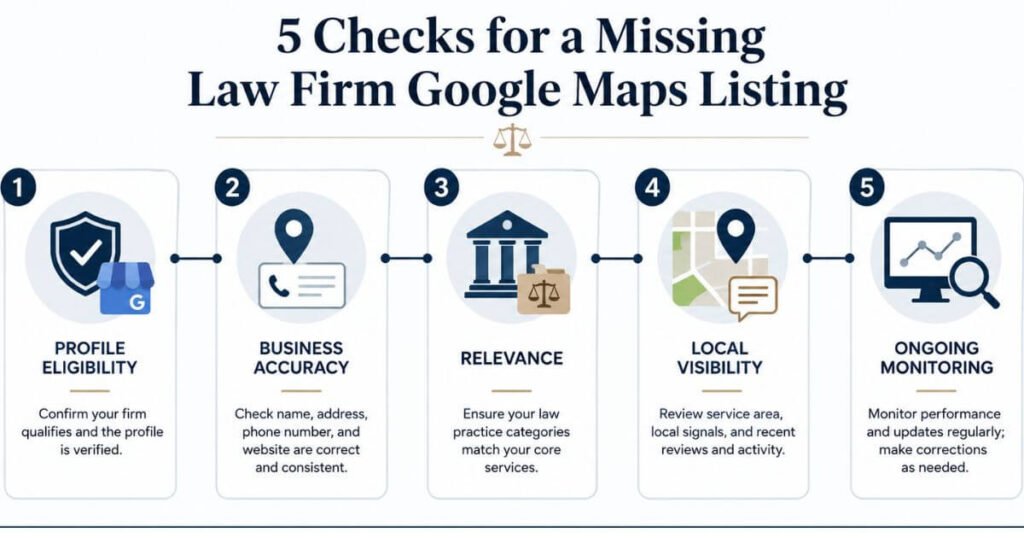
Work through these in order instead of changing everything at once.
- Priority 1:
Profile Eligibility: Confirm verification, check for suspension, and remove duplicate profiles.
- Priority 2:
Business Accuracy: Fix your name, address, phone number, and map pin.
- Priority 3:
Relevance: Correct your primary category and practice area details.
- Priority 4:
Local Visibility: Add reviews, photos, and citations one by one, week after week.
- Priority 5:
Ongoing Monitoring: Check your profile monthly rather than editing it constantly.
How to Tell Whether the Problem Is Fixed
Test the Same Searches Again
Run the same searches you used at the start of this process. Comparing identical terms gives you an honest before and after picture. Skipping this step makes it easy to fool yourself into thinking things improved.
Compare Results From Multiple Locations
Check your visibility from at least three different spots in your service area. A fix that only works from your office is not fully effective yet. Real progress shows up across the whole area, not just one corner.
Check Both Maps and the Local Pack
Confirm your firm appears in both Google Maps and the local pack on standard search. These two results do not always recover at the same speed. Monitor both weekly and don’t expect them to update simultaneously. Continue tracking before concluding there’s a problem.
Record Visibility Before and After Changes
Jot down which searches, locations, and results you tested along the way. This record proves progress and flags problems early if visibility slips again. A basic spreadsheet works fine for this kind of tracking.
When Your Law Firm Still Does Not Appear
Recheck Profile Eligibility
Go back to the eligibility basics if visibility has not returned after a few weeks. A missed suspension notice or unresolved duplicate is often the hidden cause. Read every notification Google sent your account before assuming the worst.
Review Recent Business Changes
Think through any recent moves, rebrands, or staff changes at your firm. These changes can slow recovery even after every visible fix is in place. Google simply needs more time to trust a firm that recently changed.
Compare Against Local Competitors
Look closely at what top ranking firms near you are doing differently. Review volume and profile completeness usually explain the remaining gap. Match their pace instead of trying to beat it overnight.
Escalate Persistent Profile Problems
Stop guessing and randomly editing fields if nothing has worked after real effort. At this point, a proper support escalation or expert review saves time. Constant small edits without a clear plan tend to slow recovery further.
FAQ
Why Is My Law Firm Not Showing in Google Maps?
Four things usually cause this problem.
- Your profile is unverified. You must verify it.
- Your profile is suspended. Check your dashboard.
- You have a duplicate listing. Delete the extra one.
- Your address does not match. Fix the mismatch.
Why does my law firm show on Google Maps but not in the local pack?
Maps and the local pack are different. They use different ranking signals. Ranking well on one does not mean you rank well on the other. You must fix both separately.
Why does my law firm rank in one area but not another?
A sharper category can help. But it rarely fixes the problem alone. Eligibility issues matter more. Accuracy issues matter more. Fix these first. Then change your category. Think of the category as one small piece. It is not a shortcut. It is not a complete fix.
Can a new law firm appear in the Google Maps local pack?
Yes, a new firm can rank once its profile is verified, accurate, and building real reviews over time.
Does changing my Google Business Profile category fix local pack visibility?
A sharper category helps, but it rarely solves visibility alone if eligibility or accuracy issues remain. Think of it as one piece of a larger fix, not a shortcut on its own.
How long does it take for a fix to show up on Maps?
Different changes take different amounts of time. Address changes appear within hours or a few days. Phone changes appear within hours or a few days. Ranking recovery takes a week or more. Suspension appeals have no set timeline. Check your visibility every week. Write down each change you make.
Fix your firm’s Google Maps visibility
You now have the diagnostic framework to identify and fix your firm’s visibility problem. Check your progress weekly and document what works. Reach out to Faheem Bhatti SEO Services for a full audit of your Google Business Profile and local rankings today.
