

A firm opens a second office, builds a matching page for it, and organic traffic barely moves. Sometimes it even drops. This happens more often than most firms expect, and the cause usually traces back to multi-office law firm SEO done without a clear page structure. Sibling pages built around the same practice area end up competing with each other instead of building shared strength.
This is law firm keyword cannibalization, and it shows up most in law firm location pages and law firm office pages built as near identical copies. A multi-location law firm website structure needs each page type to have its own job, from the practice hub down to the individual office page. This guide walks through how to structure law firm location page SEO so growth across offices doesn’t work against itself.
Why Multi-Office Law Firms Face SEO Cannibalization
Multi-office law firms face issues when sibling pages target the same search intent with little unique content. Multiple similar pages can make it less clear which URL should rank for a given query. Instead of combining your strength into one authoritative page for each topic, you end up with several pages that step on each other’s message.
How sibling office pages compete for similar searches
A firm with a Dallas office and a Houston office often builds nearly identical personal injury pages for each. Both pages target the same broad terms and offer little unique value beyond the city name. These are presented as factual Google behavior, but the evidence reviewed does not establish this exact mechanism.
The article repeatedly presents the following as established mechanisms: ‘sibling pages split ranking strength.’ These are SEO interpretations, not statements directly established by Google documentation.
Why copied location pages create weak signals
Swapping only the city name, address, and phone number doesn’t create a genuinely useful local page. A few reworded sentences on top of the same template still leave the page thin. Google will not penalize you for having duplicate/near-duplicate content.
However, when pages are very similar with overlapping intent, Google’s canonicalization system may choose one as representative and give it priority in search results. That’s why distinct page purposes matter. It is not to avoid a penalty, but to ensure the right page gets selected for the right search. Near identical pages offer little additional value to a visitor searching for that specific location. When two pages read almost the same, neither one stands out as the authoritative answer. The fix isn’t more text. It’s giving each page a real reason to exist beyond a copied template.
What Should Each Page Target?
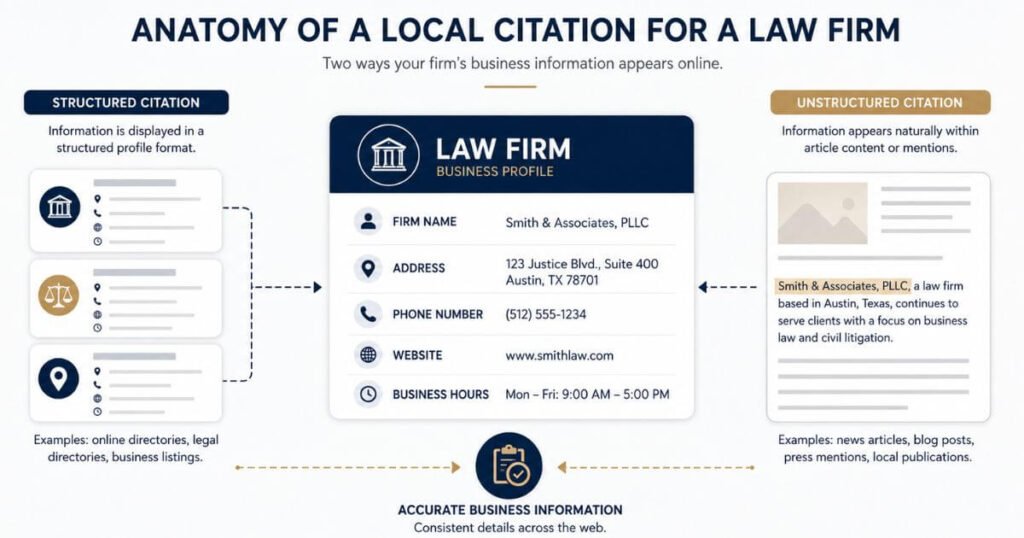
Different page types should target different jobs, not the same keyword from a different angle. This is the core answer to cannibalization.
| Page Type | Main Purpose | Primary Focus |
| Homepage | Firm identity | Brand + broad firm information |
| Practice page | Explain a service | Practice area |
| Office page | Explain a physical location | City/office |
| Practice + location page | Serve a specific local search | Practice + location |
| Attorney profile | Explain an attorney | Attorney + expertise + office |
Each row above answers a different question a visitor might have. A homepage speaks to the firm as a whole, while an office page speaks to one physical location only. A practice + location page only earns a spot when a specific local search actually justifies it. Giving every page type its own clear job is what keeps sibling pages from competing with each other.
How Should Law Firms Structure Office Pages?
Give every physical office its own useful page
An office page should cover the real details of that location. That includes the office name, accurate address, phone number, and hours. Add map information, the attorneys working from that office, and the services actually available there. Include any relevant courts tied to that location and clear local contact/intake information.
Don’t build a page just because a city showed up in keyword research. The office needs to represent a genuine location the firm actually serves. A page built around a real, physical office gives visitors something a template copy never can.
Make each office page locally useful
Local details only help when they’re real and relevant, not stuffed in for keyword count. Courthouse information tied to that office matters more than a generic city description. Mention the local service area, office access, and parking or transit information where it applies. List the attorneys based there and any relevant local legal resources worth sharing.
Don’t manufacture local references just to make a page look different from its siblings. A parking note that isn’t true, or a courthouse mention that doesn’t apply, undermines the page’s credibility. Real local detail is what separates a useful office page from a copied template.
How Should Practice Pages Work With Locations?
Keep broad practice topics on central pages
A page like /practice-areas/personal-injury/ should explain the firm’s overall personal injury practice. Cover the types of cases handled, the general process, and who the firm serves. Add common questions and highlight the firm’s firm-wide expertise in this area.
This page shouldn’t turn into a list of every city the firm serves. That job belongs to a different page type entirely. Keeping the practice page focused on the service itself, not the location, keeps its purpose clear.
Use location pages for local search intent
A page like /locations/dallas/ should explain the Dallas office itself. This covers the office details, not a repeat of the practice-area content. If a specific local practice page is justified, something like /locations/dallas/personal-injury/ can exist too.
That more specific page should only exist when there’s a genuine reason for it. Create a practice + location page only if: –
- That office genuinely offers that practice area
- You can write substantially different content than the practice hub
- The location has distinct attorney expertise or service differences
- Search data shows demand for that specific location + practice combination
When Should You Create Practice Location Pages?
Create one when local demand justifies it
A practice + location page earns its place only when specific factors line up. Consider the actual search demand for that combination in that city. Weigh the practice importance at that particular office and the office availability for that service. Check the actual services offered there, the local competition, and whether existing content already covers the topic well enough.
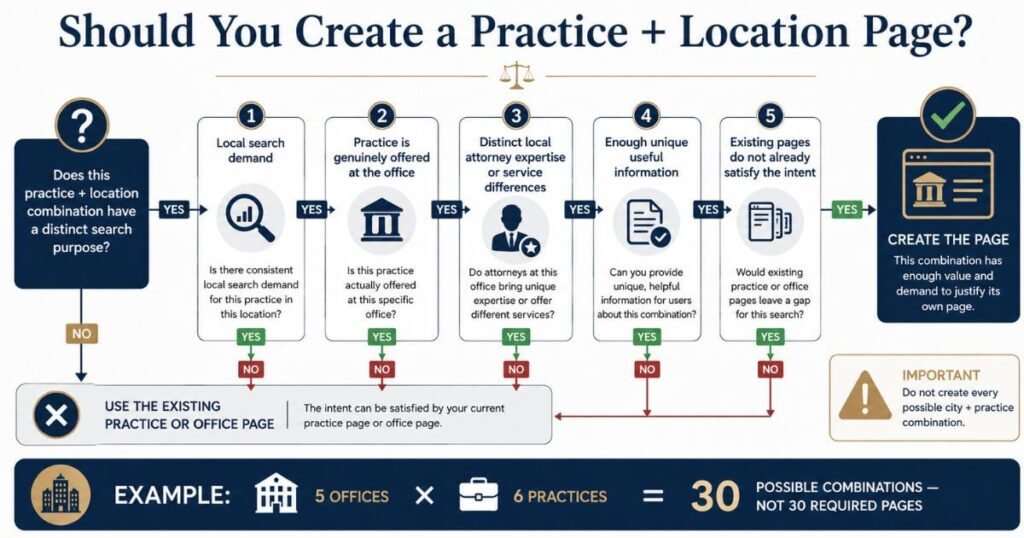
The real test is whether enough unique information can be provided for that specific page. If a location genuinely handles a practice area with real local demand, the page earns its spot. If not, the broader practice page or office page already does the job.
Avoid creating every possible combination
Five offices and six practice areas add up to thirty possible combinations on paper. That math doesn’t mean a firm needs thirty pages. Treating the matrix as an automatic page generation requirement creates exactly the thin, overlapping pages that cause cannibalization in the first place.
The matrix works better as a planning tool than a checklist to fill in completely. Each combination still needs to pass the local demand test above before it becomes a real page. Skipping combinations that don’t clear that bar keeps the site’s structure clean.
How Should Internal Links Prevent Cannibalization?
Connect practice pages to relevant offices
A practice hub page should link out to the offices that actually offer that service. A personal injury practice page can link to the Dallas office page and the Houston office page, if both handle that practice area. This gives search engines and visitors a clear path from the service to the locations that provide it.
Don’t turn this into an enormous link list pointing at every office the firm has. If an office doesn’t handle that practice area, it doesn’t belong in that link section. Relevant links only, not a full site directory dropped into one page.
Link office pages back to practice hubs
The relationship should work in both directions. A Dallas office page can link to its personal injury practice page and its family law practice page, matching what that office actually handles. This creates a clear, honest map between what the firm does and where it does it.
This two way linking makes each page’s role crystal clear for visitors. Google also uses links to discover pages and understand site structure, so logical internal linking helps search engines follow your intended page relationships. An office page that only lists services it truly offers avoids confusing overlap with other locations. Consistency here supports the page-differentiation work covered earlier in this article.
Keep attorney profiles connected to the right office
An attorney profile should link back to that attorney’s primary office, not every location the firm has. In turn, the office page should list the attorneys who actually work from there. A practice page can link to relevant attorneys too, when that connection is accurate and useful.
Avoid having the same attorney profile appear identically across every office page regardless of where they actually work. That pattern misleads visitors who expect to meet the attorney at that location. It also dilutes your site’s credibility if attorneys appear to work everywhere. Keep attorney assignments honest. Accurate attorney to office connections keep the whole internal linking structure trustworthy.
How Should Google Business Profiles Match Office Pages?
Give each eligible office its own profile
A firm’s Google Business Profile setup should reflect its real locations, not an aspirational list of cities. For eligible locations, Google recommends connecting the Business Profile to the page that represents that specific location. However, eligibility comes first. It confirms the location meets Google’s guidelines for separate profiles before assuming it needs one. Business type and structure affect whether a separate profile is appropriate. This keeps the connection between a physical office and its online presence accurate. This connection is also an important part of a broader Law Firm SEO That Turns Search Ranking Into Qualified Legal Cases. Because location pages and business profiles need to reinforce the same local signals.
Claiming a Business Profile location is just the first step. Ranking in local search depends on relevance, distance, prominence, and whether your profile is complete and accurate. Set up each Business Profile according to Guidelines for representing your business on Google, not by assuming all profiles will perform the same way. Profile quality, completeness, and how well it matches your website matter.
Keep location information consistent
Each profile should carry the same core details as its matching office page. Core information should accurately represent the same real world business. Name and address should be consistent. Phone numbers may be location specific. Categories depend on the specific location’s offerings, not necessarily a universal firm-wide category. Add a website or location URL that points to the correct page for that specific office.
Small mismatches, like a different suite number or an outdated phone line, create confusion for both visitors and search engines. Keeping this information consistent across every profile supports the accuracy the rest of the site structure depends on.
How Should Attorney Profiles Fit Multi-Office SEO?
Connect attorneys to their primary office
An attorney profile should make a few things clear right away. Where the attorney actually practices, which office they’re associated with, and what they practice. It should also state which jurisdictions they’re licensed in, since that detail matters for legal credibility.
Don’t create multiple duplicate attorney pages just to target different cities with the same bio. One attorney, one profile, tied to their primary office. Splitting one person into several near-identical pages creates the same kind of thin content problem covered earlier with location pages.
Add attorneys to locations where they actually work
An attorney should only appear on the office pages where they genuinely practice. Assigning them to offices they don’t actually work from creates a misleading location signal for visitors and search engines alike. That mismatch can confuse someone trying to reach the right person at the right location.
Keeping attorney assignments accurate protects the usefulness of the whole site, not just one page. A visitor who shows up expecting to meet an attorney who isn’t really at that office loses trust fast. Accuracy here matters as much as it does for office hours or an address.
How Can Firms Audit Cannibalization Risks?
Compare pages targeting the same search intent
A simple audit table helps spot overlap before it becomes a real problem.
| Page | Location | Practice | Main Keyword | Search Intent | Action |
| /locations/dallas/personal-injury/ | Dallas | Personal Injury | dallas personal injury lawyer | Local service search | Keep, refine local proof |
| /locations/houston/personal-injury/ | Houston | Personal Injury | houston personal injury lawyer | Local service search | Keep, refine local proof |
| /blog/personal-injury-guide-dallas/ | Dallas | Personal Injury | dallas personal injury lawyer | Same as location page above | Merge or redirect |
| /practice-areas/personal-injury/ | Firm-wide | Personal Injury | personal injury lawyer | Broad service search | Keep as central hub |
Look for pages sharing the same primary keyword, the same location, or the same practice area. Watch for nearly identical content across two or more pages, or multiple pages answering the same question. Check whether internal links point to these pages inconsistently, since that often signals the site itself isn’t sure which page should rank.
Consolidate pages that have no unique purpose
An attorney should only appear on the office pages where they genuinely practice. Assigning them to offices they don’t actually work from creates a misleading location signal for visitors and search engines alike. That mismatch can confuse someone trying to reach the right person at the right location.
Keeping attorney assignments accurate protects the usefulness of the whole site, not just one page. A visitor who shows up expecting to meet an attorney who isn’t really at that office loses trust fast. Accuracy here matters as much as it does for office hours or an address.
What Does A Good Multi-Office Structure Look Like?
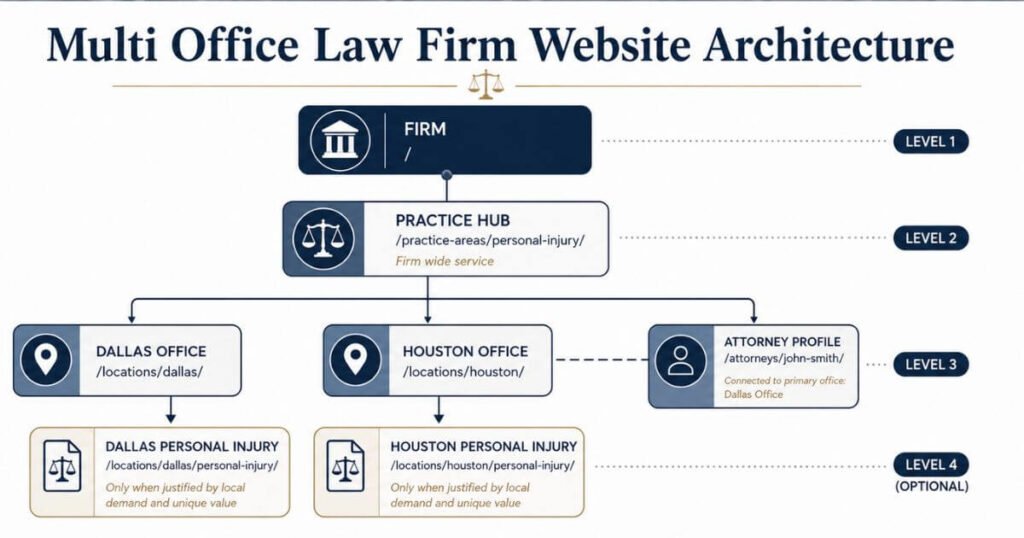
Here’s how the pieces fit together for a firm with two offices and one shared practice area:
| Level | Example URL | What It Covers |
| Firm | / | Overall brand and firm identity |
| Practice hub | /practice-areas/personal-injury/ | The service itself, firm-wide |
| Office | /locations/dallas/ | The Dallas location |
| Office | /locations/houston/ | The Houston location |
| Local practice page (if justified) | /locations/dallas/personal-injury/ | Personal injury, specific to Dallas |
| Local practice page (if justified) | /locations/houston/personal-injury/ | Personal injury, specific to Houston |
| Attorney profile | /attorneys/john-smith/ | One attorney, tied to their primary office |
The relationship flows in one clear direction:
- Practice explains the service across the whole firm
- Location explains one physical office
- Local Practice only exists when local demand justifies the extra page
- Attorney ties back to their one primary office, not every location
Each level has its own job. None of them try to do another level’s work, which is exactly what keeps sibling pages from competing against each other.
Frequently Asked Questions
Does every law firm office need its own page?
No, only genuine locations that serve real clients need one. The page should offer real location-specific information, not just an address. A satellite office with no real presence doesn’t need a full page.
Should every office have a separate Google Business Profile?
Only eligible offices under Google’s own guidelines qualify for a separate profile. Claiming a location doesn’t automatically make it eligible or guarantee it ranks. Follow Google’s criteria first, not a blanket “yes” for every office.
Do law firms need a page for every practice in every city?
No. A page only makes sense when there’s a distinct search purpose behind it. Without enough unique, useful information, the practice hub or office page already covers it.
How do law firms avoid keyword cannibalization?
Map out search intent, then assign each page a clear purpose. Build unique local value into each page instead of copying a template. Link pages logically and audit for overlap on a regular basis.
Should every location page use the same content?
Shared brand information can stay consistent across every page. But each location page needs real, location-specific details beyond just the city name. A copied page with a city swap doesn’t serve the same purpose.
Start Getting Your Structure Right Now
Working through office pages, practice pages, and attorney profiles without creating overlap takes a fair amount of planning. If you want a second set of eyes on how your firm’s pages are structured, Faheem Bhatti SEO at faheembhattiseo.com is worth a look.
