

Google Business Profile configurations for law firms fall into three types: storefront (public address), service area (hidden address), and hybrid (both address and service area). Your choice depends on how clients actually reach your firm and your state bar’s advertising requirements.
This single configuration decision affects both your local search visibility and your legal advertising compliance at the same time. A firm cannot pick this setting by guessing. The right choice depends on:
- Office type: whether clients visit your office, you travel to them, or both
- State bar rules: what your jurisdiction requires for attorney advertising
- Business model: how your practice actually operates
Getting this decision right protects you against both Google policy violations and state bar compliance problems. Getting it wrong can trigger either one, or both.
Which Google Business Profile Setup Fits Your Law Firm?
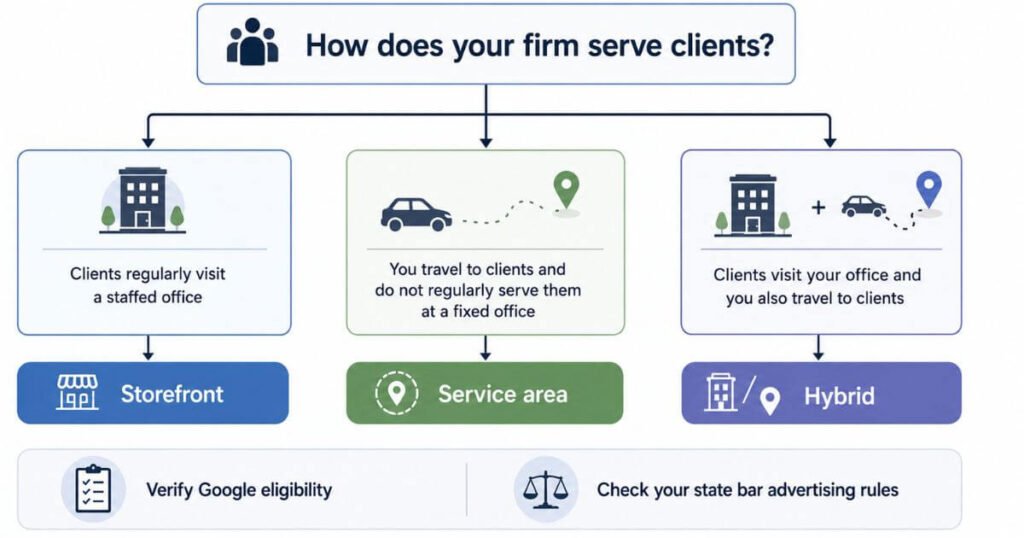
Start with how your firm actually operates.
| How your firm operates | Google model to evaluate | What to verify |
| Clients regularly visit a staffed office | Storefront | Physical location eligibility and state advertising rules |
| You travel to clients and do not serve them at your address | Service area | Service area eligibility and state advertising rules |
| Clients visit your office, and you also travel to clients | Hybrid | Address and service area requirements |
| You use a virtual office without operating there | Do not assume eligibility | Google eligibility and state law requirements |
| You have multiple genuine offices | Separate profile for eligible locations | Location pecific eligibility and applicable state rules |
Google’s current guidance says a business may qualify for a Business Profile if it has a physical location customers can visit or if it travels to customers.
How Google Business Profile and State Bar Rules Affect Your Setup
Law firms must comply with two independent rule systems: Google Business Profile policies and your state bar’s professional conduct/advertising requirements. A firm can follow every Google rule and still violate state bar advertising rules, or vice versa. These systems do not communicate.
Why this matters for your setup decision:
- Google’s eligibility requirements determine whether your profile can remain active
- State bar advertising rules determine whether your configuration is legally compliant in your jurisdiction
- Both requirements apply to your setup at the same time
- Small setup mistakes can trigger policy violations from Google, compliance issues from your state bar, or both
This guide explains both systems and how to verify compliance in your specific jurisdiction before publishing your profile.
Three Google Address Models for Law Firms
Google offers three address setups. Each one fits a different kind of law practice. Picking the wrong one creates ranking problems or compliance problems later. See Google’s official guidelines for service area businesses before choosing an address model for your firm.
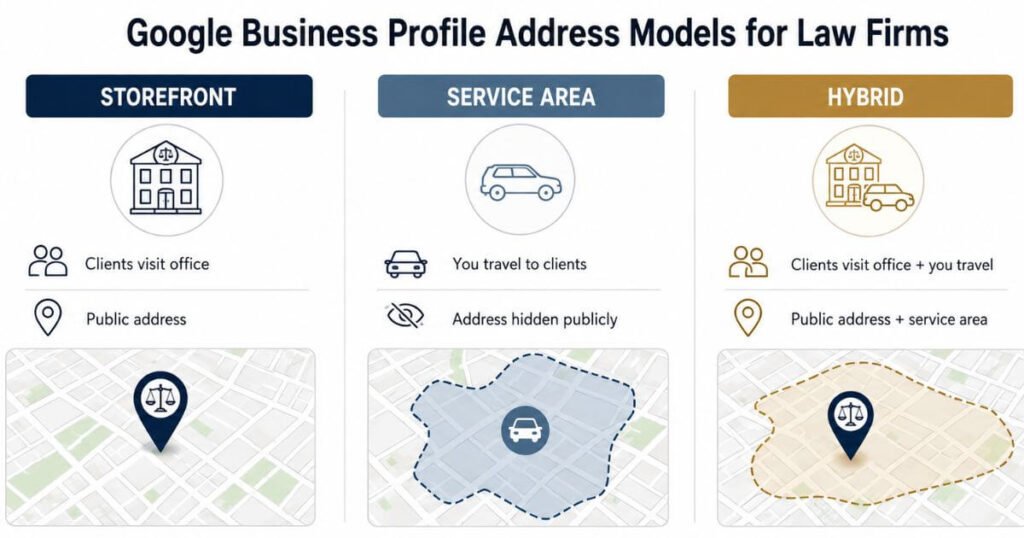
Storefront model (Clients Visit Your Office)
A storefront profile is appropriate when clients regularly visit your office location and conduct business there.
Google’s eligibility requirements for storefront:
- A real, physical business location where customers can access services
- Staffed during published business hours
- Visible business signage or building directory listing
- Google can verify the location through documentation (lease, utility bill, signage photo)
Does NOT qualify:
- Mailing only addresses with no physical presence
- Virtual offices with no actual premises
- Nominal locations where you do not actually conduct business
- Coworking spaces without exclusive access or verification of your presence
Google displays your address publicly to all searchers. Use this model only if you have a genuine client-facing office where clients regularly appear in person.
Service area model (You Travel to Clients)
A service area profile is appropriate when you travel to clients and do not regularly serve customers at a fixed office location.
How it works:
- You provide a physical address to Google during setup (for verification purposes only)
- Google keeps this address private; it is not displayed publicly
- Your public profile shows only the cities/counties/regions you serve (your service area)
- Clients see your service area, not your office location
Google’s eligibility requirements:
- A real, verifiable address (even though it remains hidden)
- You actually serve customers within the service area you list
- Service area boundaries must be realistic and match your actual service territory
Important: One service area business should maintain one profile for its entire service territory. If you operate genuinely separate service areas with different teams, you may create separate profiles but only when each has distinct staff and truly separate service areas.
Hybrid model (Office + Travel to Clients)
A hybrid profile is appropriate when you have a physical office that clients can visit and you also travel to serve clients across a wider geographic area.
How it works:
- Google displays your public office address
- Your profile also lists the geographic areas you serve (cities/counties)
- Both the address and service area appear on your profile
When to use this model:
- You have a staffed office where clients visit
- You also travel to clients in surrounding cities or counties
- Both activities are significant parts of your practice
Important: The service area identifies where you work, but does not automatically expand your ranking reach. Google ranks results by relevance, distance, and prominence—not by whether you list a service area. The service area should accurately reflect your actual service territory, not aspirational coverage.
How Address Visibility Affects Local Search
What Google documents:
Google ranks local search results using three primary factors:
1. Relevance: How well your business matches the search query
2. Distance: How far the searcher is from your business
3. Prominence: How well known/established your business is (based on reviews, citations, links, etc.)
Google does not list address visibility as an independent ranking factor. A service area profile (hidden address) does not inherently rank worse than a storefront profile (public address).
Practical consideration (not a Google ranking rule):
A storefront profile creates a fixed geographic point on the map. A service area profile does not. This means:
- Storefront profiles may perform better for very localized searches (searchers within 1 to 3 miles of your office)
- Service area profiles prioritize relevance and prominence over tight geographic proximity
For regional searches or servicea rea based queries, the model type is less important than your relevance and prominence signals (reviews, citations, links, content quality)
State Bar Rules That Apply Alongside Your GBP Setup
Google Business Profile policies and state bar professional conduct/advertising rules operate independently. They do not override each other, but they both apply to your firm.
The bona fide office standard
Florida uses a bona fide office test for law firm advertising. The rule checks for a real physical location used on a regular and continuing basis. Reviewers look for an outside office sign or a listing on the building directory. Full time staff at the location also supports this standard.
An address that only receives mail fails this test completely. A shared conference room rented by the hour does not count either. Firms can still call a shared space available by appointment in ads. That label only works if the space is not presented as a full office.
California’s disclosure requirement
California Rule 1 to 400 requires all advertisements to disclose a location. Show the city, town, or county of your bona fide office, or use your State Bar address. This applies to websites, Google profiles, and all advertising.
If you use a storefront profile, your Google address satisfies this. If you use service area (hidden), you must still disclose your office elsewhere. Hybrid profiles satisfy the requirement. Verify your disclosure format with qualified counsel before publishing.
New York’s principal office rule
New York requires two separate things. Rule 7.1(h) mandates that your advertisements must display your principal office address. Google’s service area profile alone doesn’t satisfy this. Virtual offices are allowed if they meet regulatory standards.
Section 470 requires out of state lawyers to maintain a bona fide office in New York; this doesn’t apply to residents. Verify your specific situation with the New York State Bar’s ethics hotline before setting up your profile.
What to Check Before Setting Up a Service Area Profile
Before you hide your address or set up a service area business profile, verify your specific state’s attorney advertising requirements. Rules vary significantly by state.
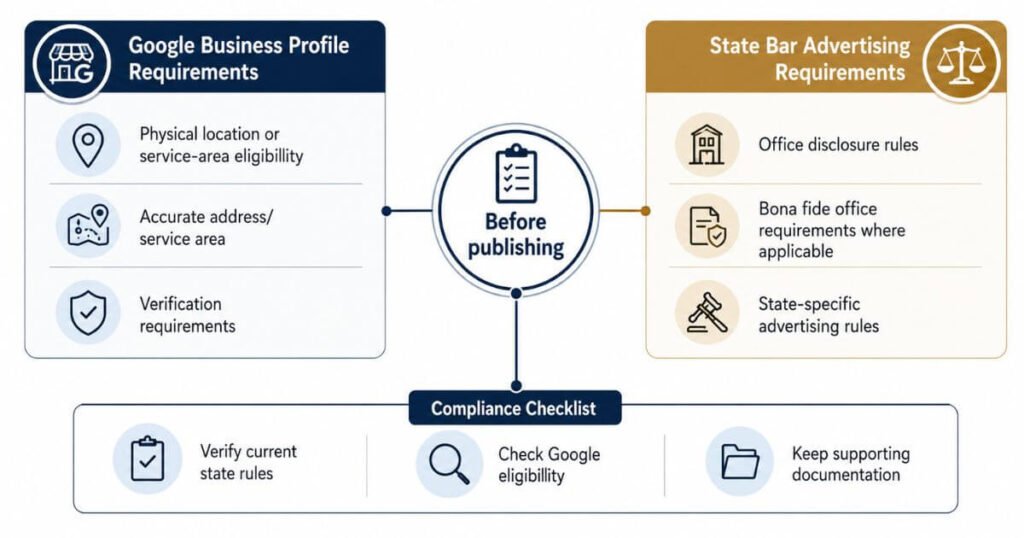
Steps to verify your state’s rules:
Check your state bar’s current advertising/practice rules. These are often Rule 7.2 or equivalent under the ABA Model Rules. Review relevant ethics opinions from your state bar regarding office location and disclosure requirements. Contact your state bar’s ethics hotline or consult qualified legal counsel for clarification on your specific practice situation. If licensed in multiple states, check every state’s rules separately. They vary significantly.
What to confirm in your research:
Does your state require a physical office to be disclosed in advertising? Does your state allow service area/hidden address setups, and under what conditions? Must the disclosed office be staffed full time or open during specific hours? Does your state bar registration require a specific office format or address? Are there specific restrictions on virtual offices or remote practices?
Why this matters: Skipping this step risks a compliance violation with your state bar. Google Business Profile settings alone cannot prevent or fix state bar violations. You must know your state’s requirements before publishing.
Why Google Verifies Law Firm Listings
Law firms must meet Google Business Profile’s standard eligibility requirements, just like all businesses. However, business categories prone to misrepresentation are subject to verification reviews. These categories include legal services, real estate, and locksmith services.
Google’s general verification process may request:
Google may request signage photos. They may ask for lease or property ownership documentation. They may require utility bills in the business name. They may conduct location verification through online records. This is not specific to law firms. It applies to all business categories.
Separately: Keep state bar documentation ready
Your state bar registration and licensing documentation are important for demonstrating your firm’s legitimacy. These are compliance requirements, not Google verification requirements.
Keep the following available: State bar registration/license information, proof of business address/location, and any required disclosures under your state’s advertising rules. For a broader explanation of how these factors work together, see our guide to law firm SEO.
Switching Configuration Models Without Losing Your Listing
Changing your address configuration model carries risk. When you make significant profile changes, Google may require re-verification of your location and business information.
To minimize risk when switching models:
Update all your information consistently. Update your name, address, and phone (NAP) simultaneously across your Google Business Profile, your website and location pages, online business directories and citations, and your state bar registration.
Make changes one step at a time. Do not change multiple elements simultaneously. Update one source, wait for confirmation, then proceed to the next. Have documentation ready. Keep verification documents available in case Google requests them during the transition. These include signage photos, lease or property documentation, utility bills, and state bar registration information.
Why NAP consistency matters:
Mismatches between your Google profile, website, directories, and state bar registration can create confusion. They may trigger a review. Maintaining consistency across all sources is a general local SEO best practice.
Note: Google may request re-verification during model changes, but this is not a guarantee. It depends on the specific change and Google’s review processes at the time.
Configuring Multi-Office and Multi-County Firms
A firm with two offices needs two separate Google profiles, not one. Google allows this only when each office has its own distinct staff and its own service area that does not overlap the other. A firm covering adjoining counties from one office can add that county to its service area directly.
Offices sitting close together, even across a state line, still count as separate locations under this rule. Each profile needs its own unique phone number tied to that specific office. A local phone number works better here than a shared toll free line. Firms with one true office and no travel service should skip adding a service area at all.
Pre-Publish Compliance Checklist for Law Firms
Confirm these points before publishing or updating a law firm listing.
- Address accuracy: The listed address matches the real office or the verified private address on file with Google.
- Category accuracy: The primary category reflects the actual practice, not a broader unrelated category.
- Service area boundaries: Areas listed do not overlap with another office run by the same firm.
- NAP match: Name, address, and phone number match exactly across the website, the profile, and outside directories.
- Bar registration alignment: The address on file with the state bar matches what clients see in ads and online.
- Disclosure statement: Any state specific ad disclosure, such as California’s city or county rule, appears somewhere on the site.
- Documentation on file: Signage photos, lease records, and staffing proof stay ready in case Google requests a review.
Frequently Asked Questions
Can a law firm hide its address on Google Business Profile
A law firm can hide its address using the service area business setup. Google still requires a real verified address behind the scenes. State bar disclosure rules may still require the location to appear somewhere in the firm’s advertising.
Does a service area setup rank worse than a storefront listing
A service area setup does not directly lower rankings. Google ranks by relevance, distance, and prominence, not by address visibility alone. A hidden address can weaken results for very close, tight radius searches near the firm.
Does a virtual office satisfy state bar advertising rules
A virtual office rarely satisfies a bona fide office standard on its own. States like Florida require regular staffing and full time use of the space. A mailing only address without staff usually fails this test.
What happens if my state requires a bona fide office but I want a hidden address
The bar rule applies regardless of the Google setting chosen. A firm can hide its address on Google while still disclosing a bona fide office location in its advertising, since the two requirements are separate.
Can two law offices in different counties share one Google profile
Google requires a separate profile for each staffed office location. Two offices with separate staff and non overlapping service areas each need their own listing under Google’s guidelines.
Get Your Free GBP Compliance Check Today
Visit faheembhatti.com to get your law firm’s Google Business Profile reviewed for free. We check your address setup, service area accuracy, and state bar compliance before you publish anything.
