
Google Search Console for law firms remains the most overlooked source of truth that most firms already own. Search engines quietly hand over data on GSC for lawyers every single day, yet most never open the report. A proper law firm Search Console review reveals four metrics that explain almost every SEO question a firm asks.
Learning to understand the metrics changes how a firm reads its own performance completely. This guide moves step by step, starting with how to find which searches bring visibility. From there, it covers how to find which pages carry visibility and how to diagnose gaps between visibility and traffic. This work connects directly back to our broader guide on why law firm Seo websites stop bringing in cases.
Start With The Data That Matters
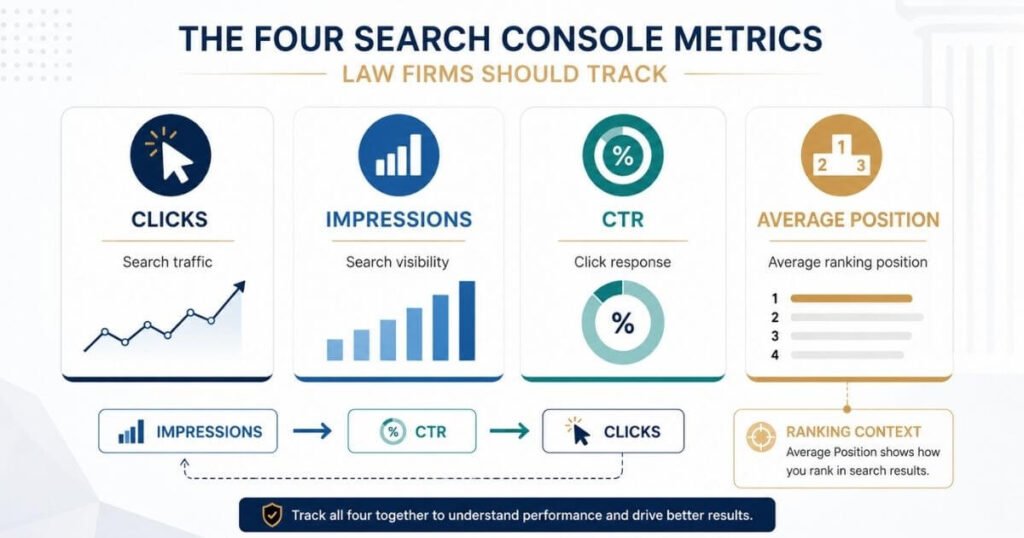
Four core numbers anchor every meaningful Search Console review. Clicks, impressions, CTR, and average position each measure something different entirely. Google defines CTR as clicks divided by impressions, a simple ratio worth memorizing. Average position reflects the average topmost position of the site’s result across impressions, not one fixed rank. Full technical definitions of every metric live inside Google Search Console Help.
These precise definitions matter more than most firms realize going in. Misreading even one of these four numbers skews an entire diagnosis. This distinction stands as the first load bearing factual claim in any real Search Console review. Getting this foundation right shapes every decision made afterward.
Understand Clicks And Impressions
Impressions visibility shows how often a page appeared for a search term. Clicks search traffic shows how many people actually chose that result. High impressions, low clicks usually point toward a weak listing, not weak rankings. Low impressions, low clicks instead suggests a deeper visibility problem entirely.
Rising impressions and rising clicks signal healthy, compounding growth worth celebrating. Falling impressions and falling clicks signal a real decline needing quick investigation. These four scenario patterns cover nearly every situation a firm will face. Spotting the right pattern fast saves real time during every review.
Read CTR And Position Correctly
Average position is not one fixed ranking, since it shifts across every search variation shown. A single search should not be treated as definitive proof of anything meaningful. Google notes that Search Console position can differ from an individual search result seen live. This gap confuses many firms checking their own rankings manually.
Trends matter more than a single day’s number pulled from the report. Watching movement across weeks reveals real change far better than one snapshot. Firms chasing daily fluctuations often miss the larger pattern building underneath. Real diagnosis always starts with trend data, not isolated numbers.
Find Which Searches Bring Your Firm Visibility
Analyze Queries By Search Intent
Every query pulled from this report fits neatly into one intent category. Branded searches cover a branded firm name search, someone already looking for you directly. Practice area searches include terms like personal injury lawyer, targeting a specific service offered. Attorney searches and location searches, such as personal injury lawyer Houston, narrow that intent further.
Problem based searches, like what to do after a car accident, show early research behavior. Informational searches sit close beside them, seeking general knowledge instead of a firm. High intent searches, such as personal injury lawyer free consultation, show someone ready to act now. Query filtering inside the Performance report makes sorting these groups genuinely simple.
Separate Branded From Nonbranded Visibility
Branded impressions and nonbranded impressions tell two very different growth stories. Branded clicks often arrive easily, since visitors already recognize your firm’s name. Nonbranded clicks reflect real, earned visibility built through actual search work. Comparing branded CTR against nonbranded CTR shows how much traffic already existed beforehand.
This split separates existing brand demand from genuinely new search visibility earned recently. A branded and non branded query filter now exists inside the Performance report for eligible properties. Using this filter keeps a firm from overstating its own SEO progress. Real growth only counts once brand demand gets removed from the picture.
Use Pages To Find Your Strongest Opportunities
Find Pages Getting Search Impressions
Start by sorting for high impression pages sitting inside your Pages report. Note which pages are gaining impressions and which pages are losing impressions steadily. Group these results across practice area pages, location pages, blog posts, and attorney pages. Each page type carries its own separate performance pattern worth reviewing.
A page already pulling impressions is worth investigating before creating a new page entirely. Many firms rush to publish fresh content while ignoring pages already close to breaking through. Reviewing existing pages first almost always produces faster, cheaper results. This single habit shift often changes a firm’s whole content strategy.
Find Pages With Low Click Through
Open the Pages tab, then view results sorted by CTR directly. Low CTR pages often hide in plain sight once sorted this way. Review the titles, descriptions, and content alignment for each flagged page carefully. A mismatch between any of these three often explains the weak clicks.
This forms a clear diagnostic chain worth remembering going forward. Impressions lead to SERP visibility, which leads to CTR, then finally to clicks. Identifying the pattern this way beats guessing at a random fix. For a deeper technical breakdown of ranking mechanics, link out instead to a dedicated guide on that topic.
Discover Where Your Rankings Are Stuck
Find Queries Near Page One
Look for queries carrying meaningful impressions alongside relevant intent already present. Positions around page two or three deserve especially close attention here. Existing clicks on these queries prove real demand already sitting there. Strong business relevance makes these terms worth prioritizing over brand new targets entirely.
These near misses can become priority optimization opportunities almost immediately. A page already earning some clicks close to page one needs far less work than starting fresh. Firms often overlook these pages while chasing entirely new content instead. Prioritizing them first usually produces the fastest visible movement.
Track Position Changes Over Time
Compare your previous period against your current period for every important query. Track the same query, the same page, and the same metrics across both windows. Watch impressions, clicks, CTR, and position shift together, never in isolation. A rising position without rising clicks often hides a listing problem underneath.
Google recommends watching for significant changes and reading trends rather than position alone. Small week to week swings rarely carry any real meaning on their own. A genuine pattern only reveals itself once it holds across several weeks. Patience with this comparison keeps a firm from chasing noise instead of signal.
Connect Queries To The Right Pages
Find Which Pages Google Shows
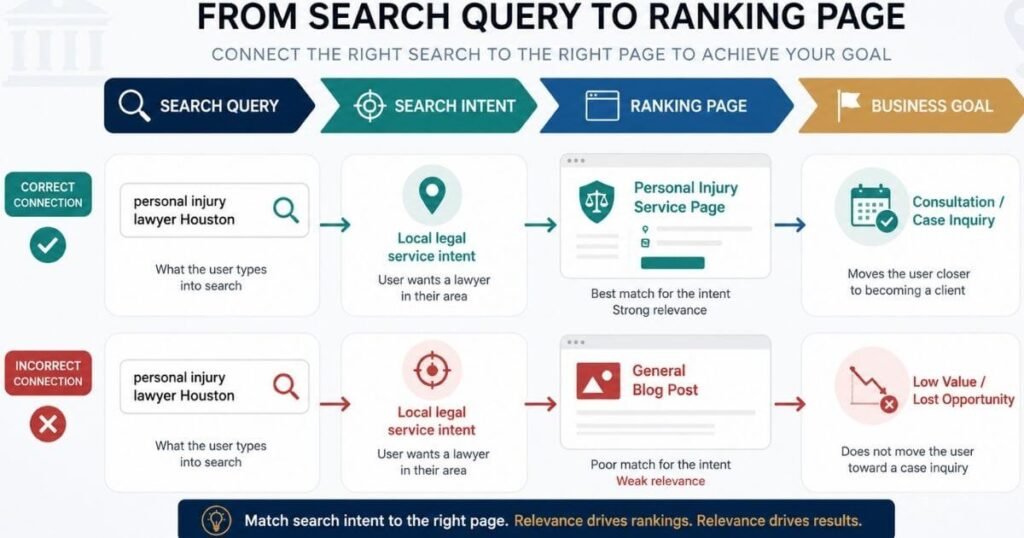
Open the Queries tab and locate the specific term worth investigating. Select a query from that list to begin the deeper check. Open the Pages tab next to see which URL Google is showing for it. This simple workflow answers a question most firms never think to ask.
Several hidden problems can surface through this single check alone. Correct page ranking confirms everything works exactly as intended already. A blog post ranking instead of a service page signals a real structural gap. Multiple pages competing for the same query, or an unexpected page association, both point toward the same underlying fix.
Match Pages To Search Intent
Every query follows one repeating chain worth checking carefully. Query intent ranking page page purpose, each piece connects directly to the next. Take personal injury lawyer Houston as a clear, practical example here. This term should point toward a local legal service page, not a general resource.
An unrelated informational article ranking here signals a structural mismatch, not a content flaw. Fixing this connection usually matters more than any content rewrite attempted. Recognizing this pattern early saves a firm from editing the wrong page entirely. Matching page purpose to real intent solves problems no content polish ever could.
Diagnose Why Visibility Is Not Producing Traffic
High Impressions And Low CTR
Several areas deserve close review when impressions look strong, but clicks stay weak. A search intent mismatch often explains this gap better than any title tweak alone. A weak title or weak description can quietly suppress genuine interest too. An unclear value proposition leaves searchers with no real reason to click through.
Heavy SERP competition sometimes explains the gap regardless of listing quality shown. Page relevance and a query page mismatch deserve careful review here as well. This is not automatically a title tag problem worth fixing first. Ruling out these other causes first prevents wasted effort on the wrong fix.
Low Impressions And Low Clicks
When both numbers stay low together, the investigation shifts direction entirely. Check real search demand first, since some terms simply carry little volume. Review indexing next, confirming the page actually appears in results at all. Weak page relevance or thin topic coverage can quietly suppress visibility too.
Poor internal linking and limited authority both cap how far a page can climb. Heavy search competition adds further pressure on top of everything else. Review targeting closely, since a page built for the wrong term rarely gains traction. This usually points toward a visibility problem rather than a conversion problem entirely.
Check If Important Pages Are Indexed
Use URL Inspection For Key Pages
Run URL Inspection individually on every important practice area page you have. Check location pages and attorney pages using that same tool. Service pages deserve this same careful, one by one review too. Skipping this step leaves real indexing problems hidden from plain view.
This tool reveals what Google knows about a specific URL directly. It answers a simple but critical question: whether a page is on Google at all. Running it across your most valuable pages first catches the biggest risks fastest. A single missed indexing issue can quietly erase a page’s entire visibility.
Review Page Indexing Problems
Watch closely for pages flagged as not indexed inside this report. Note any crawl issues or indexing issues surfaced during that review. Excluded URLs deserve real investigation, since exclusion sometimes happens by pure mistake. Technical problems flagged here often explain sudden visibility losses seen elsewhere.
The Page Indexing report provides a broad overview of known URLs and their status sitewide. URL Inspection instead works best for investigating individual URLs one at a time. Use the wider report first to spot sitewide patterns worth chasing. Then use targeted inspection to dig into any single page needing closer review.
Segment Your Law Firm’s Search Data
Compare Pages By Practice Area
Group your search console data around each core practice area separately. Review personal injury, family law, and criminal defense as distinct, separate segments. Employment law, immigration, and medical malpractice each deserve their own individual review too. Blending every practice area into one number hides real, specific problems.
Identify which areas show strong visibility and clicks compared to weaker ones nearby. Note any ranking opportunity sitting unused inside a specific practice area. Watch for signs of decline within any single segment closely. Strong demand in one area often quietly masks decline sitting right beside it.
Compare Local And National Visibility
Use location patterns and query wording to sort searches into clear groups. Separate local searches from broader city searches inside the same overall market. Statewide searches and national searches behave completely differently from local ones entirely. Branded searches deserve their own separate lane within this same comparison.
A firm may show strong overall impressions while having weak visibility in local high intent searches that matter most. This gap often hides behind an otherwise healthy looking overall report. Segmenting the data this way exposes that weakness immediately and clearly. Fixing local visibility usually produces faster case growth than chasing broad national terms.
Turn Search Console Data Into SEO Actions
Prioritize High Value Opportunities
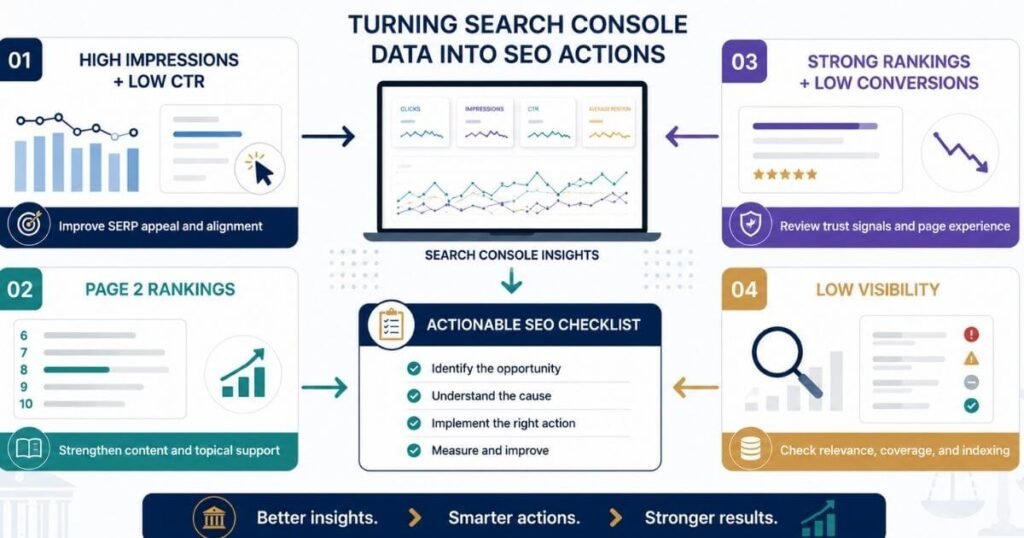
Real action starts by sorting every finding into four priority groups.
- High impressions with low CTR needs stronger listing appeal and clearer alignment
- Page two rankings with relevant intent needs a strengthened page and more topical support
- Strong rankings with low conversions needs review of trust signals and page experience
- Low visibility on an important service needs review of relevance, coverage, and indexing
Each of these four priority groups gets one clear, one line action attached. Sorting problems this way keeps every fix focused on real business impact. Applying the wrong fix to the wrong group wastes real, limited time. This framework turns a messy report into a clear, workable action list.
Build A Monthly SEO Review
Track clicks, impressions, CTR, and average position every single review cycle. Note your top queries and top pages during each monthly check. Break out practice area visibility and local visibility as separate tracked lines. Log any significant gains or significant losses spotted throughout the month.
Date comparison inside Search Console makes this review far easier to run consistently. Building this habit turns scattered checks into one real, repeatable monthly review. Regular reviews catch small problems long before they grow into large ones. Consistency here matters more than any single deep dive session ever could.
Avoid Common Search Console Mistakes
Do Not Judge SEO By One Metric
Looking only at rankings misses how those rankings actually translate into traffic. Looking only at traffic misses whether that traffic matches real search intent. Chasing CTR alone ignores whether the underlying page delivers genuine value. Ignoring intent entirely leads teams toward fixing symptoms instead of real causes.
Ignoring page level data hides exactly which pages need attention most urgently. Comparing unrelated periods, like a holiday week against a normal one, distorts every conclusion drawn. Every single metric only tells part of the larger story alone. Reading them together produces a far more accurate, complete diagnosis.
Do Not Treat Every Ranking Drop Equally
A dropped query always deserves investigation before any real panic sets in. Check which page dropped, not only which query moved down. Measure how much visibility actually changed throughout the decline period. Confirm whether clicks changed alongside that position, or held roughly steady instead.
Check whether the decline affects valuable searches or minor, low value ones instead. A small change on an irrelevant query is not equivalent to losing a high value one entirely. Weighing severity correctly prevents wasted panic over minor, meaningless fluctuations. Real diagnosis always separates noise from a genuine, sustained decline.
Build A Law Firm Search Console Dashboard
A simple monthly framework keeps every future review consistent and genuinely useful.
| Area | Metric | Guiding Question |
| Visibility | Impressions | Are we appearing more often? |
| Traffic | Clicks | Are searchers actually visiting? |
| SERP response | CTR | Are relevant users choosing us? |
| Rankings | Position | Are important queries improving? |
| Content | Pages | Which pages are gaining visibility? |
| Demand | Queries | What are potential clients searching? |
| Business | Leads | Is organic traffic producing inquiries? |
This final row turns the whole dashboard into a real business outcome report. Every other row measures visibility alone, but this row measures actual results. Firms tracking only the SEO rows often lose sight of what matters most. Adding this last column keeps every future review tied to real growth.
Frequently Asked Questions About Search Console
What Does Search Console Show For Law Firms?
Search Console reveals which queries surface the firm and which pages Google is actually showing for them. It also shows where visibility is growing or shrinking, and where opportunity is being left on the table.
What Is A Good CTR For Law Firms?
No fixed benchmark applies evenly across every firm and market. CTR depends on position, CTR depends on query type, and CTR depends on intent, so compare against your own position band using branded versus nonbranded baselines.
Why Does My Firm Have Impressions But No Clicks?
Several top likely causes explain this pattern, from weak titles to mismatched intent. These causes point to the deeper CTR diagnosis covered earlier in this guide.
How Do I Find My Law Firm’s Ranking Keywords?
Open the Queries tab, then sort by impressions or position for a clear view. Filter by page to isolate keywords tied to a practice area or location page directly.
Can Search Console Show Why Rankings Dropped?
Search Console shows what changed across query, page, position, impressions, and clicks, but not why. Pair that data with an update timing check for the fuller picture.
Turn Search Console Data Into SEO Decisions
The clues are already there, sitting inside a report most firms rarely open. This process was never about collecting more numbers for their own sake. It has always been about turning numbers into decisions that move real growth forward. Request a Law Firm SEO review at faheembhatti.com, or explore our full resources section for more guides like this one.
